Feb 13, 2008

Ramdom OMG's... LOL

Went to CHA.. it was amazing. Lots of new goodies.. but nothing totally blew me away. Will have pictures to share hopefully by tomorrow.


I had a blast hanging out with the girls from Cherry on top [dot] com. Thank you Laura and Kristianne for letting me HANG on you the whole time.


What else... my etsy store is open!! Check it out - click on the graphic below


stuff_by_bucket


I still have to make some of the graphics better, will do soon. Been creating to much busy-ness (not a word I know but whatever) for myself that I am all worn out.


In the mean time, look what I found. Wouldn't this be a super cool gift.

MIX TAPE USB DRIVE create a mix of how you feel and give it as a gift! Remember the days before digital music and MP3 players? If you do, then you probably made mixed tapes of all your favorite music to share with your friends and school crushes on good old fashioned blank cassette tapes! If you miss the 80's and making mix tapes, this product will inspire you again!

Create your own unique mix tape
1. ADD YOUR OWN SOUNDS TO THE USB STICK.
2. PLACE THE STICK INSIDE THE TAPE STYLE GIFT PACK.
3. WRITE YOUR OWN MESSAGE AND PLAYLIST.4. GIVE IT TO SOMEONE YOU LOVE.

64MB USB MEMORY STICK

Store your own mix on the USB stick by plugging into your PC or Mac, then add MP3 or any other files to the USB stick.

Stores up to 1 hour of high quality digital music - the same amount as you get on a C60 cassette tape. Perfect for creating your own unique compilation or mix 'tape'. When you have 60 minutes you have to think carefully about what you are going to put on there! Write your own title, messages and play list all over the retro gift pack.

OK gotta get back to work before they fire me. :-)

bucket

Feb 8, 2008

Making your own Photoshop brushes

The other day I was playing around with some of my stamps and had this 'wow' moment, wouldn't an owl look cute on a digital layout. So I decided to make some into brushes. Here is a quick tutorial I wrote up on how to do it. I hope you enjoy it.

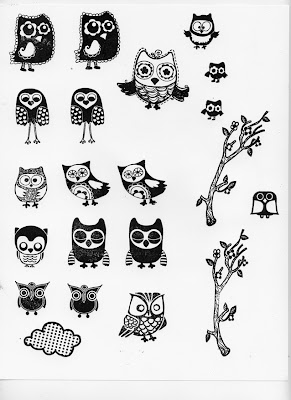
Start out by stamping your bushes on plain white paper. Try to get the best stamped image possible.

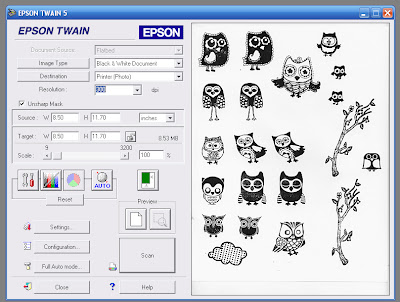
Scan in your image at a 300 resolution, and black & white document. See example below.

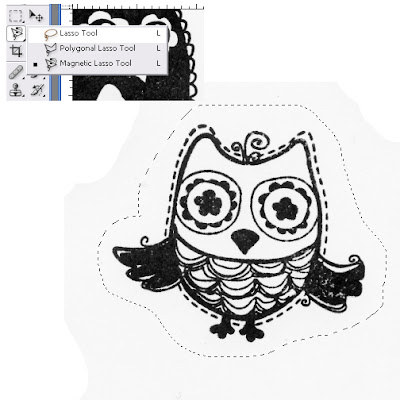
Zoom in on the first image you would like to select as your stamp, and select the image using your lasso tool. See example below.

Copy the selection and paste into a new window. Short cut keys: Ctrl – C, Ctrl – N, Ctrl – V.
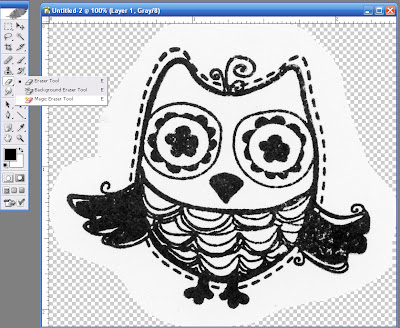
Take your magic eraser tool, or whatever tool you prefer to use to erase the white background.

Here is an example of my cleaned up image.


As you can tell my stamping wasn’t clear enough. If you’d like, you can take one of your basic circle brushes and just clean up your image a bit.

Once you feel your image is ready, let’s start creating your Photo shop brushes.

1. Click on Edit – Define Brush Preset.

2. Give your brush a name


Continue this until you have created all your brushes.

In order to save this brush set you will have to delete all the other brushes that are currently in the brush set. To do this, click on the brush selector tool and randomly delete the miscellaneous brushes in this set. See example below.


Once you have completed this you can then save your brush set.

Click on Brush Preset button, Save Brushes. Give your brushes a name. In the future when you want to bring up your favorite stamped brushes they will be saved on your computer.

I hope you found this tutorial helpful. :-)

-bucket :-)~

Random stuff making me REALLY happy

My friend Colleen virtually introduced me to The Legacy Lady aka Kayla Lamoreaux. I wrote a few digi tutorials for her and *you should see my big cheesy smile* she put one up today. -> Check it out <-

Lets see what else... drum roll please.... STAMPS!! Yes I designed some stamps. First let me fill you in on some history. I first designed these stamps back in September '07. I have some great friends who really helped me out with my team in training fundraising, that I wanted to find a special way to say thank you, so thus these stamps were born. LOL. I can't even begin to tell you how EXCITED I AM!! Below are examples of two of the three stamps I will be selling.

1. Man sign


2. Cassette tape.

The other stamp is a women sign stamp. I'm even more excited about the reason I am doing this. I am doing it for my aunt, I am fundraising (again) for Team in Training in my aunt's honor. My aunt was diagnosed in November with a brain tumor. When the biopsy came back we found out it was a cancerous brain tumor that is growing aggressively and it is inoperable. I do believe with the monies the Leukemia and Lymphoma Society has given to UCLA, a treatment will be found for my aunt. For this reason... I dedicate my season to my aunt Andrea.
I will not be profiting from the sales of the stamps, all monies earned will go straight into my team in training fundraising.
Pictured below, My uncle Santiago, my aunts Andrea and Tomasa, and my mom is on the far right.